Credit / Debit Notes
Credit Note
A Credit Note is an official document issued to customers to acknowledge and confirm the return of goods or the reduction in the value of a sales invoice. It serves as a notification that the customer’s account has been credited for the specified amount due to reasons such as product returns, overbilling, or discounts.
Purpose of a Credit Note
-
To correct an overcharged invoice.
-
To account for returned goods or products.
-
To apply agreed discounts or adjustments after the invoice has been issued.
-
To maintain accurate records for accounting and tax purposes.
Credit Note in the ERP Application
In your ERP application, the Credit Note module is designed to manage and track customer returns and adjustments in a streamlined and auditable manner.
Key Features
-
Issue credit notes against existing sales invoices.
-
Select products and quantities being returned.
-
Automatically calculate tax and total amount for the credit note.
-
Link the credit note to customer accounts for future settlements or refunds.
-
View and manage credit note history for auditing and reporting.
Managing Credit Notes
The Credit Note module allows users to record and manage credit notes issued to customers in cases such as sales returns, overbilling, or pricing adjustments.
Steps to Access and Create a Credit Note
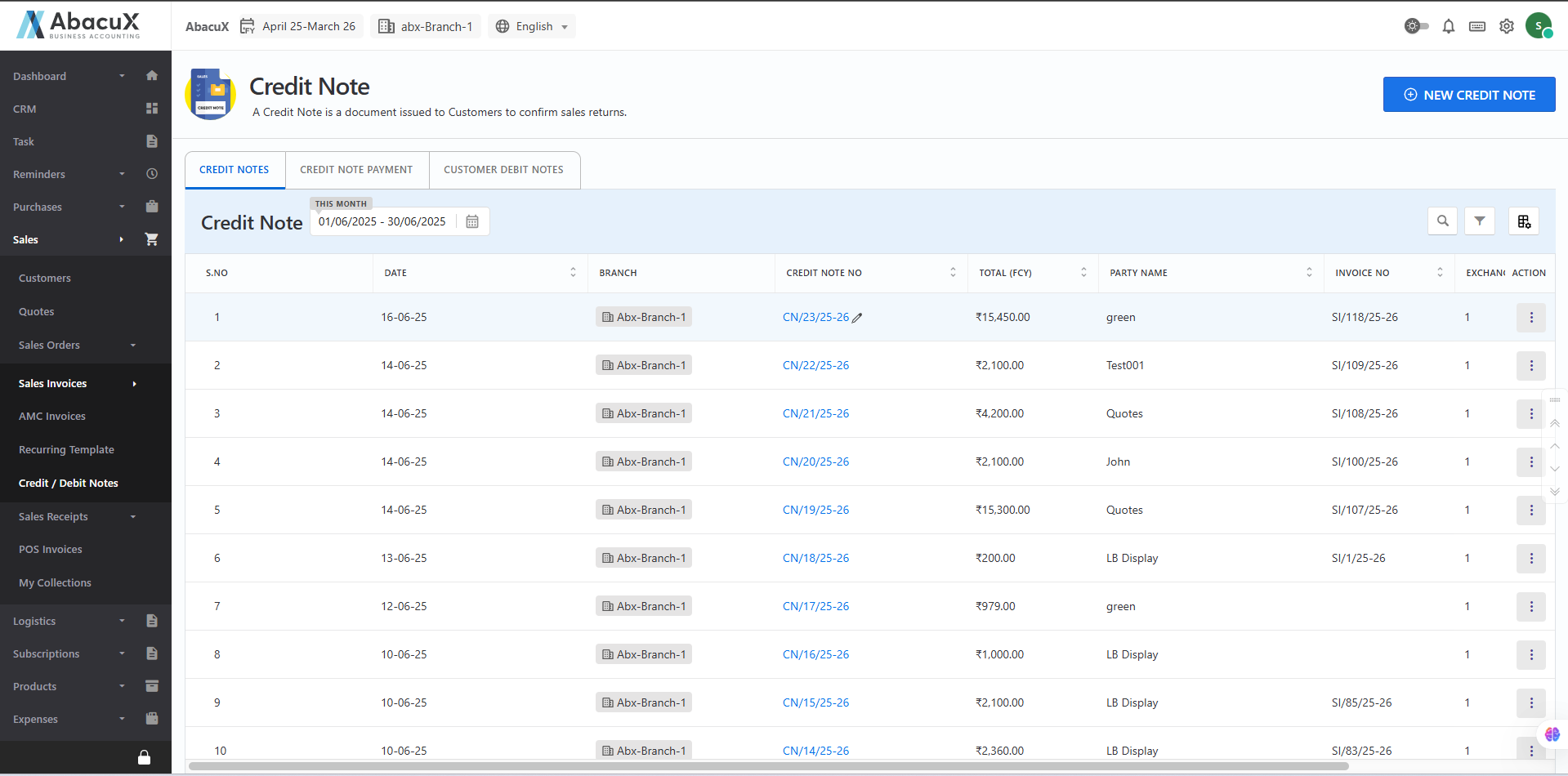
- Navigate to Sales > Sales Invoice > Credit / Debit Note to view the list of existing credit notes.
-
To add a new credit note, click the "New Credit Note" button located at the top-right corner of the page.
-
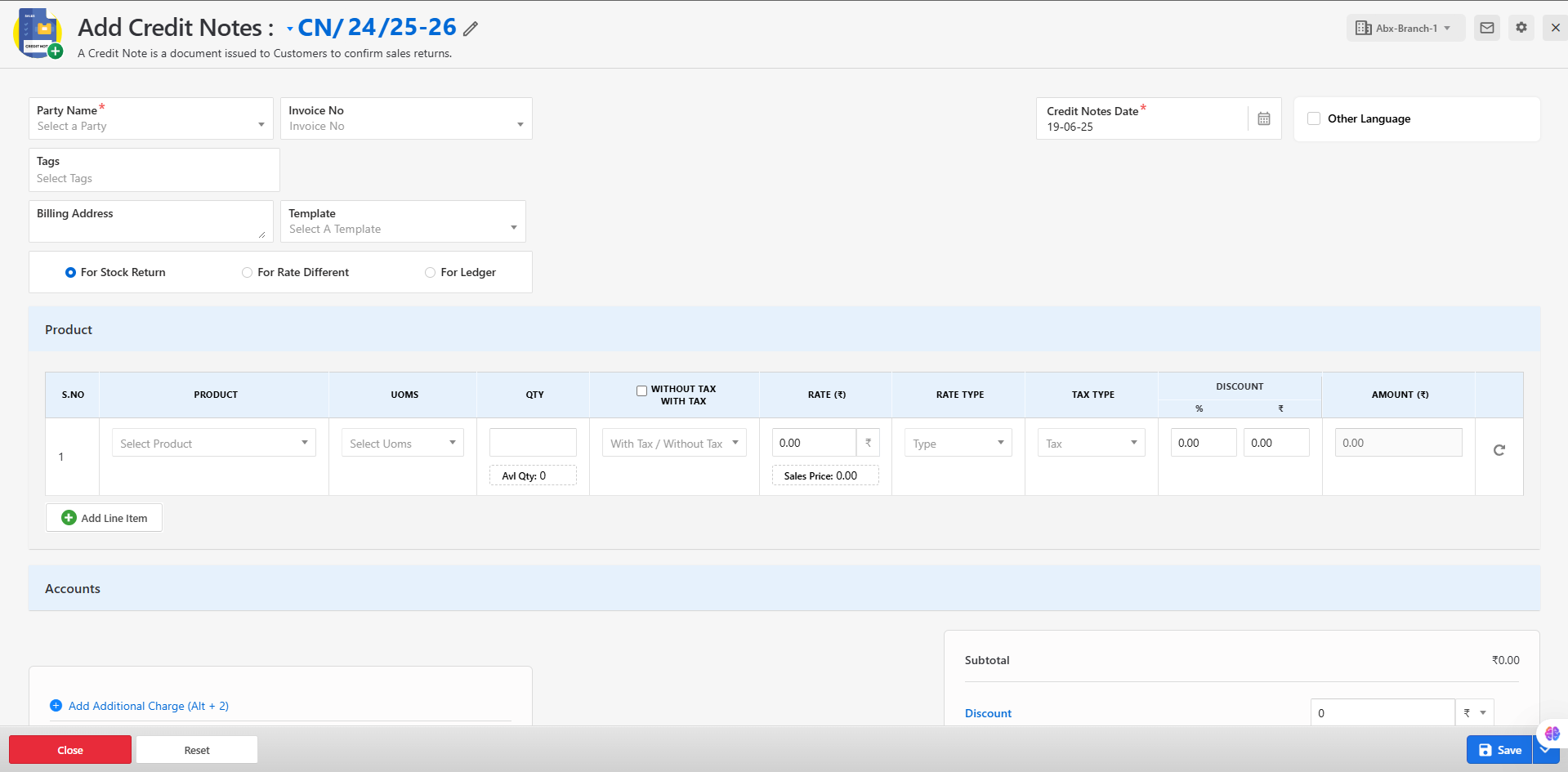
A form will appear prompting you to enter the credit note details.
-
Fill in all the required fields such as customer, invoice reference (if applicable), products, quantities, tax, and reason for the credit.
-
Click Save to generate the credit note.
-
If the form is submitted successfully, a success message will be displayed, and the credit note will be listed.
-
If there are any errors during submission, relevant error messages will be shown directly on the form for correction.
Available Actions for Credit Notes
From the credit notes list, you can manage each entry using the following actions:
Edit – Modify the credit note before finalization.
Delete – Permanently remove the credit note if no longer needed.
Print – Generate a hard copy of the credit note.
Download – Export the credit note as a PDF.
Send Mail – Email the credit note directly to the customer.
This section ensures proper handling of post-invoice adjustments and maintains accurate customer and financial records.
Audit and Reporting
Each credit note is recorded in the system with complete traceability to its related invoice, customer, and creator. These records can be used for reporting, reconciliation, and audit compliance.
Credit Note Payment
A Credit Note Payment refers to the confirmation and processing of a refund, adjustment, or payment issued to a customer against an existing credit note. This feature ensures accurate financial tracking and transparency in customer settlements resulting from sales returns, overbilling, or adjustments.
Purpose
The Credit Note Payment module is used to:
-
Record the payment or refund issued to the customer for a credit note.
-
Settle outstanding credit notes either through direct payment, adjustment against other invoices, or customer account credit.
-
Maintain clear financial records and ensure audit readiness.
Typical Use Cases
-
A customer returns goods and requests a refund.
-
A credit note is issued for overbilling and needs to be adjusted against a future invoice.
-
A credit balance is paid back directly to the customer.
Managing Credit Note Payments
The Credit Note Payment section allows users to record and manage payments or refunds made to customers against issued credit notes. This ensures accurate financial reconciliation and customer account tracking.
Steps to Access and Create a Credit Note Payment
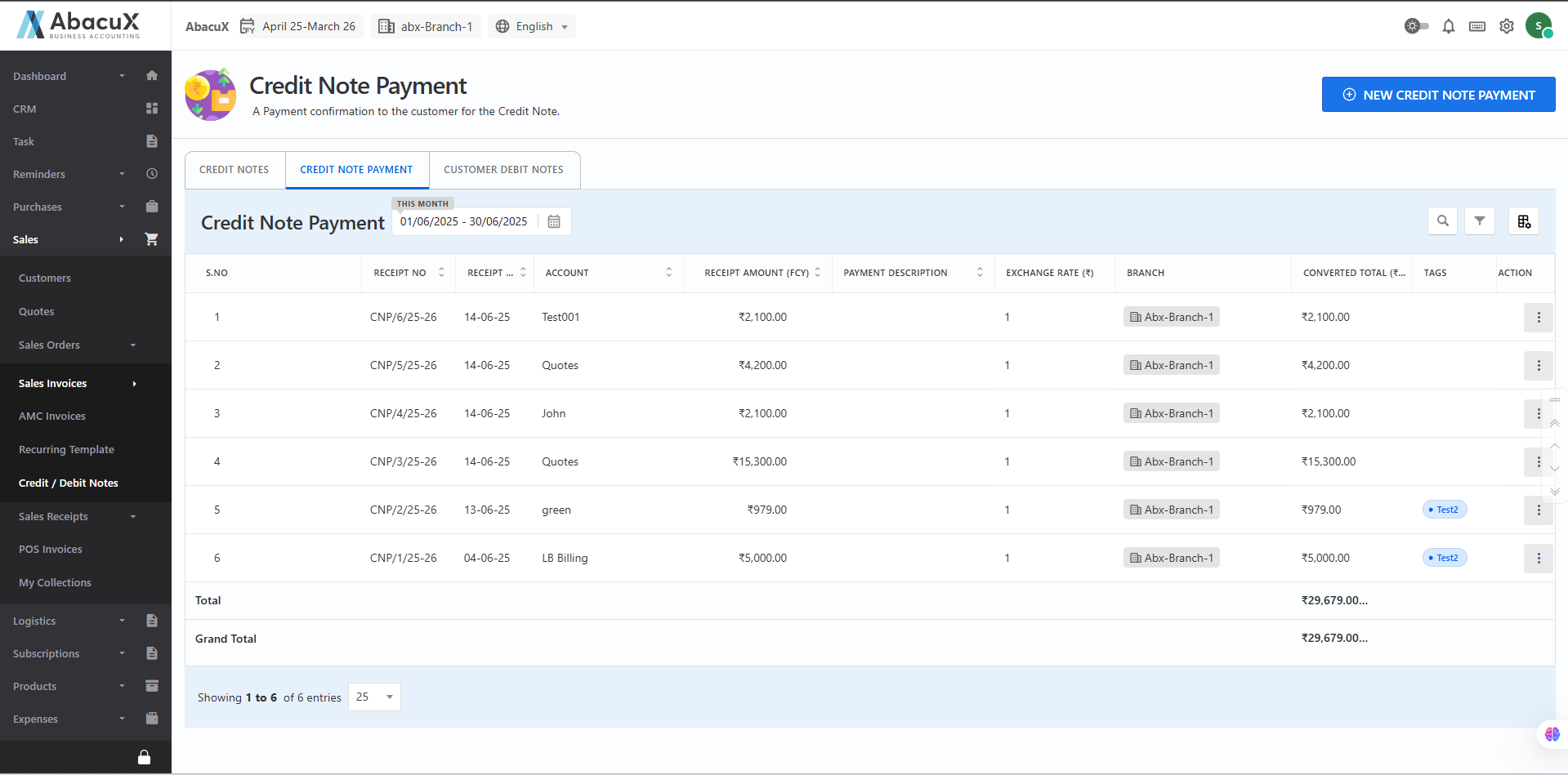
- Click on the "Credit Note Payment" tab to view the list of all existing credit note payments.
-
To add a new credit note payment, click the "New Credit Note Payment" button located at the top-right corner of the page.
-
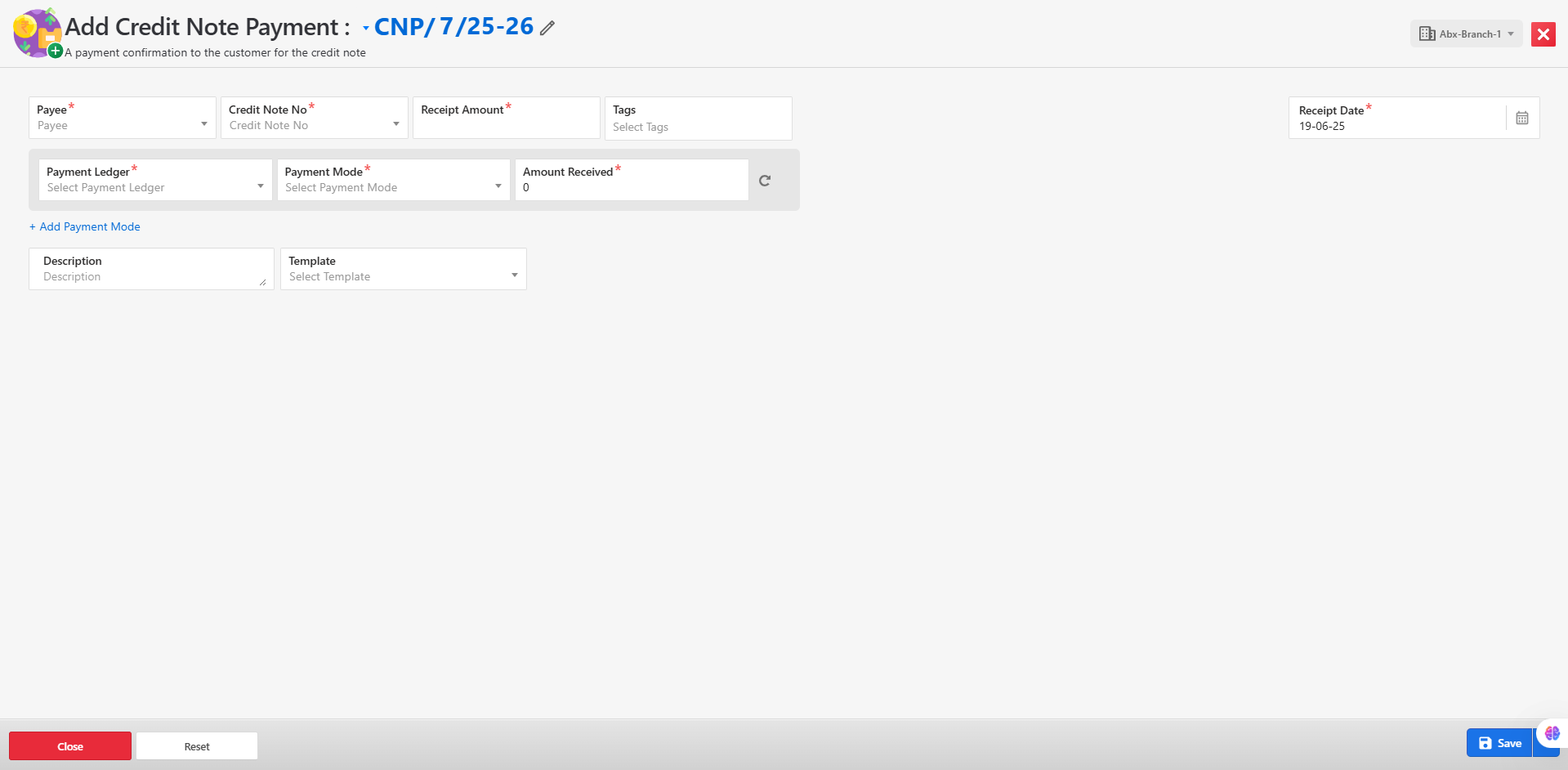
A form will appear for entering the credit note payment details.
-
Fill in all the required fields, such as customer, related credit note, payment method, amount, and remarks (if any).
-
Click Save to submit the form and record the payment.
-
If the form is submitted successfully, a success message will be displayed on the list page.
-
If there are any errors or missing details during submission, appropriate error messages will be shown on the form for correction.
Available Actions for Credit Note Payments
From the credit note payments list, users can manage entries with the following actions:
Delete – Remove the payment record if it was created in error.
Print – Generate a printable copy of the credit note payment for records or sharing.
This module ensures transparency and accuracy in handling refunds and adjustments issued to customers.
Benefits
-
Maintains transparent and traceable financial records for all customer refunds and adjustments.
-
Simplifies reconciliation and settlement processes.
-
Supports customer satisfaction with accurate and timely handling of credits.
Customer Debit Notes
A Customer Debit Note is a document issued to a customer to formally request the return of funds or adjustment in case of overpayment, incorrect billing, or return of damaged/incorrect goods or services. It acts as a reverse transaction of a credit note and is typically used when the customer owes the business an amount due to such discrepancies.
Purpose
The Customer Debit Note serves the following purposes:
-
To notify the customer of an additional charge due to price correction, underbilling, or returned payments.
-
To adjust previously over-discounted or miscalculated invoices.
-
To request repayment when goods are returned but found non-defective or unqualified for refund.
-
To maintain accurate financial records and ensure customer account reconciliation.
Key Features
-
Issue debit notes linked to original invoices or sales transactions.
-
Capture reasons for the debit (e.g., damaged return refusal, pricing correction).
-
Automatically calculate amounts and taxes based on selected items.
-
Integrate seamlessly with customer accounts for real-time balance updates.
Managing Customer Debit Notes
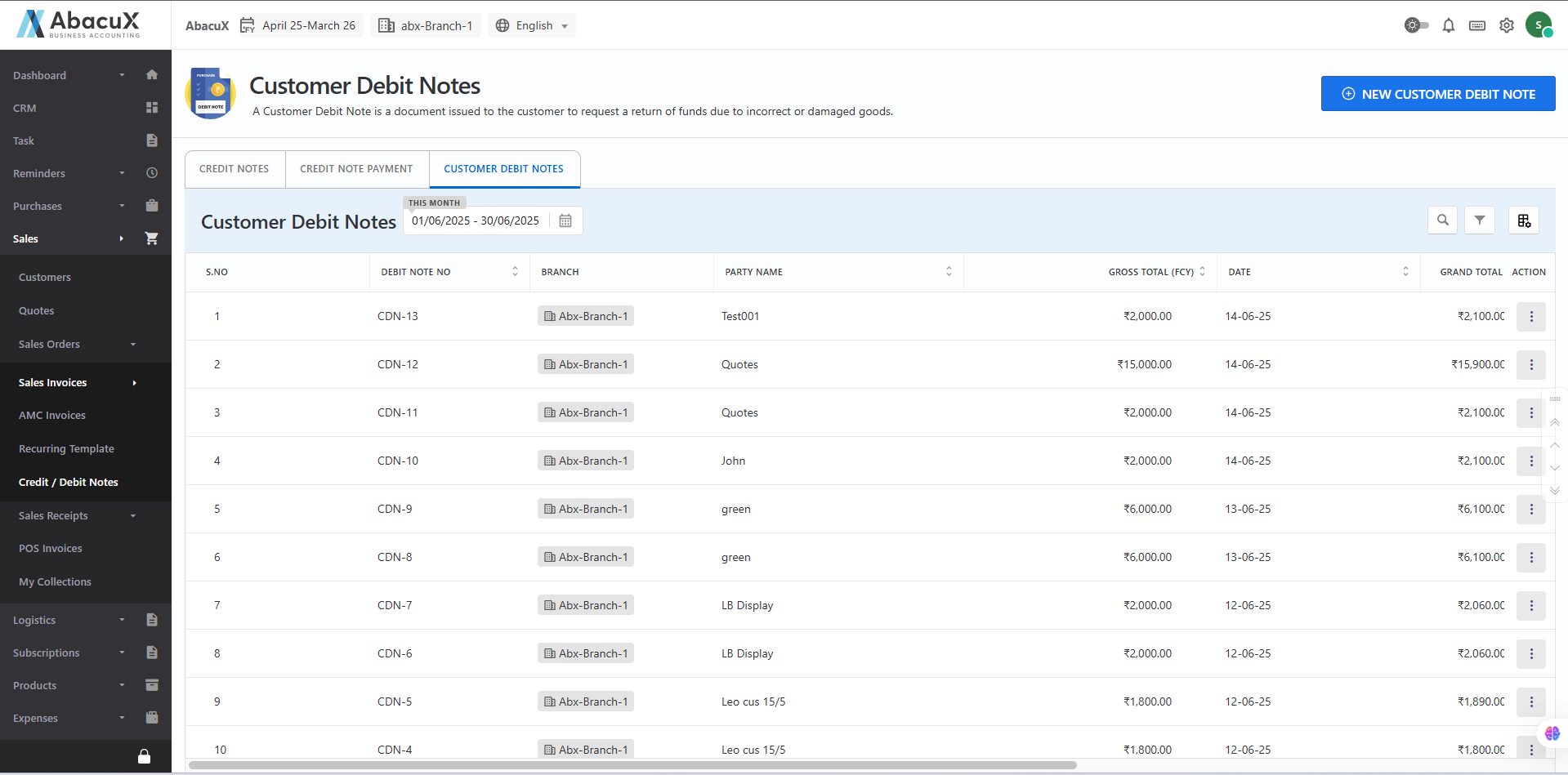
The Customer Debit Note module allows users to issue debit notes to customers in cases of underbilling, pricing adjustments, returned payments, or charges for non-refundable returns. This helps ensure accurate customer account reconciliation and financial records.
Steps to Access and Create a Customer Debit Note
- Click on the "Customer Debit Notes" tab to view the list of existing customer debit notes.
-
To create a new debit note, click the "New Customer Debit Note" button located at the top-right corner of the page.
-
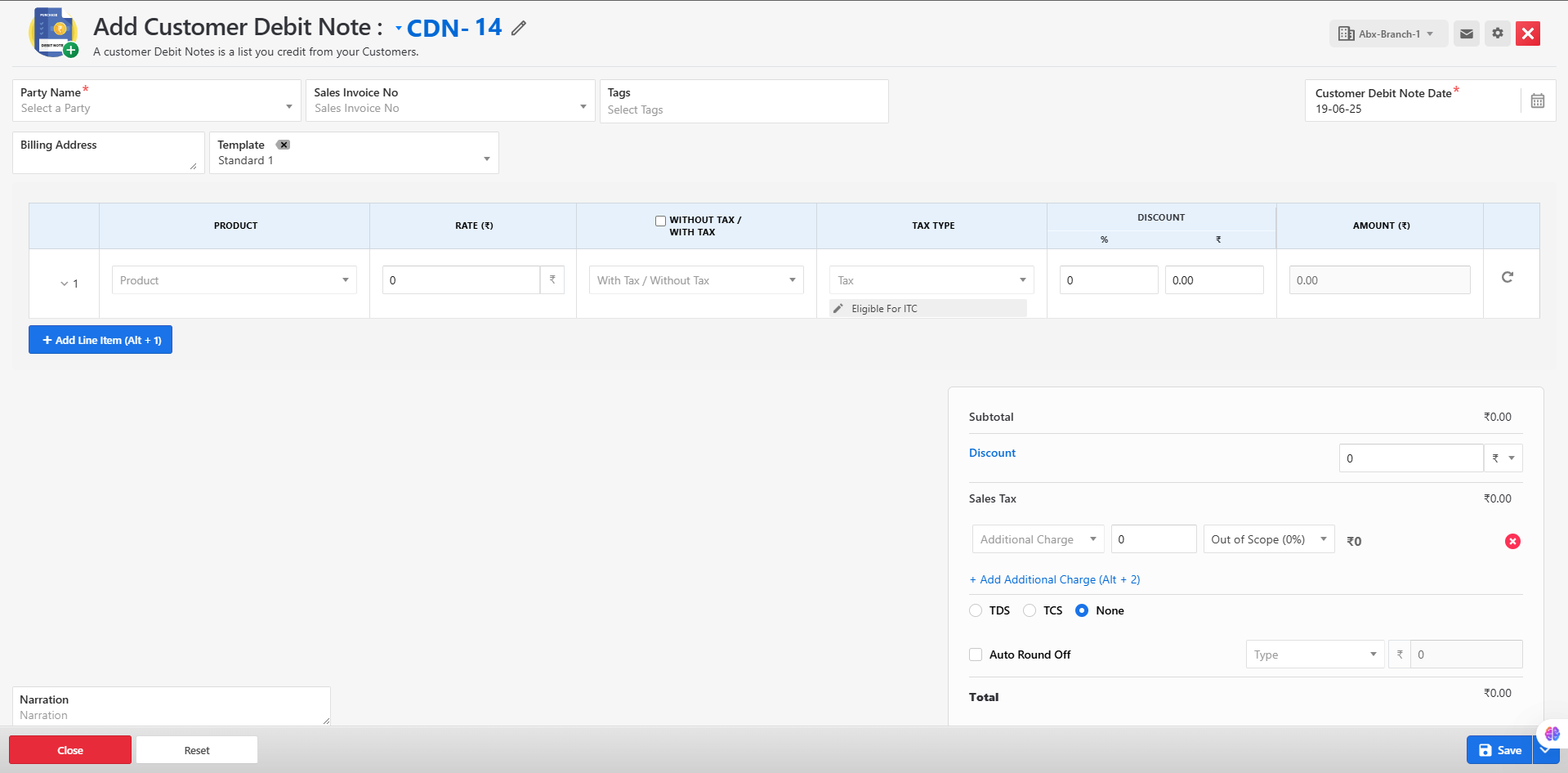
A form will open to collect the necessary information for the debit note.
-
Fill in all the required fields, including customer details, reference invoice (if applicable), debit amount, reason, and tax information.
-
Click Save to generate the debit note.
-
If the form is submitted successfully, a success message will be displayed, and the debit note will be listed.
-
If there are any errors during submission, an error message will be displayed on the form, prompting correction.
Available Actions for Customer Debit Notes*
From the customer debit notes list, users can manage each entry with the following options:
Edit – Modify the debit note details.
Delete – Remove the debit note if created in error.
Print – Generate a hard copy of the debit note.
Download – Export the debit note as a PDF.
Send Mail – Email the debit note directly to the customer.
This feature supports transparent financial adjustments and streamlined customer account management.
Benefits
-
Enhances accuracy in customer billing and account adjustments.
-
Ensures transparency and accountability in debit-related transactions.
-
Supports seamless integration with sales and finance reports.