AMC Invoices
AMC Invoices
AMC Invoices - An Annual Maintenance Contract (AMC) covers the repair and maintenance costs of the equipment. An AMC (Annual Maintenance Contract) Invoice is a billing document generated for services related to the maintenance and repair of equipment or systems, as agreed upon in the AMC contract with the customer. This invoice is typically issued on a periodic basis (monthly, quarterly, or annually) based on the terms of the agreement.
Purpose
AMC Invoices are used to bill customers for preventive maintenance, routine servicing, and emergency support provided under the scope of the contract. These invoices help ensure continuity of service and proper tracking of maintenance-related revenue.
Key Features of AMC Invoice Module
-
AMC Contract Linking
-
AMC invoices are linked directly to the customer's approved AMC contract.
-
Billing frequency, amount, and service period are auto-filled based on the contract.
-
-
Invoice Generation
-
Invoices can be generated manually or automatically based on the schedule defined in the AMC contract.
-
The invoice includes service dates, description of maintenance coverage, tax details, and payment terms.
-
Invoice Management
Steps to Access and Create AMC Invoices
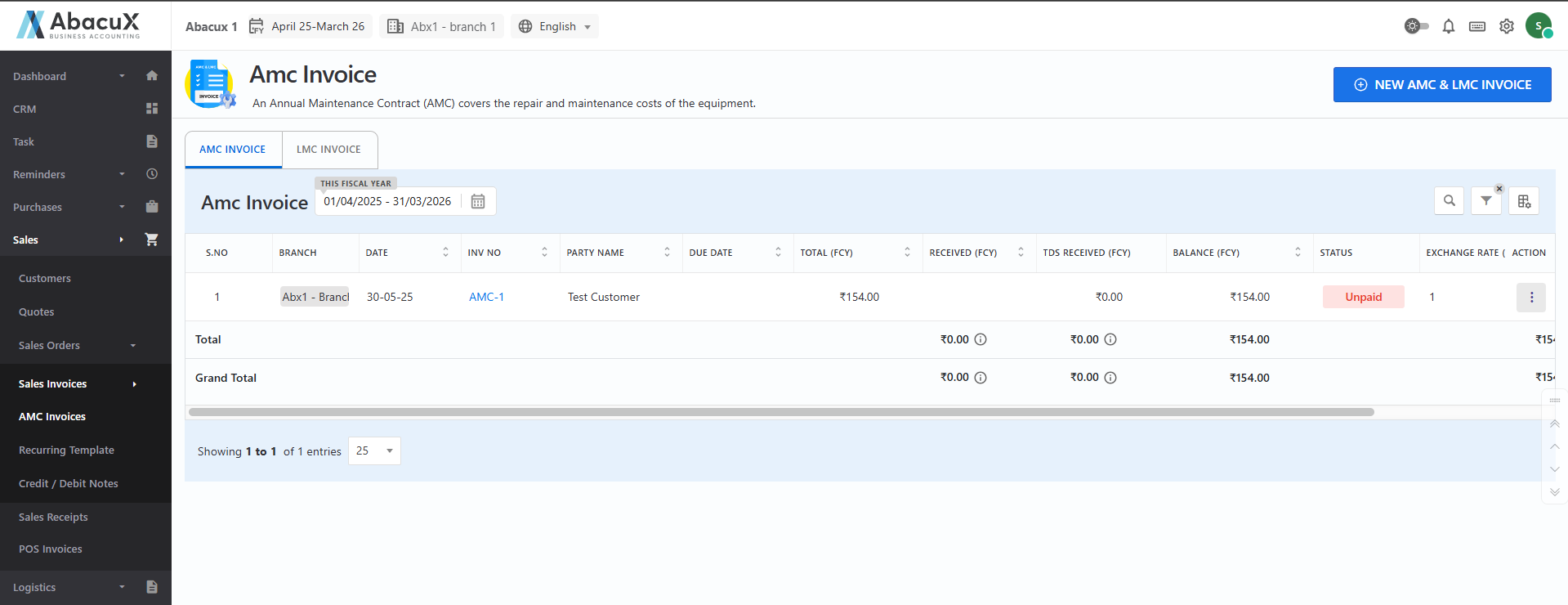
- Navigate to Sales > Sales Invoice > AMC Invoice to view the list of existing AMC invoices.
-
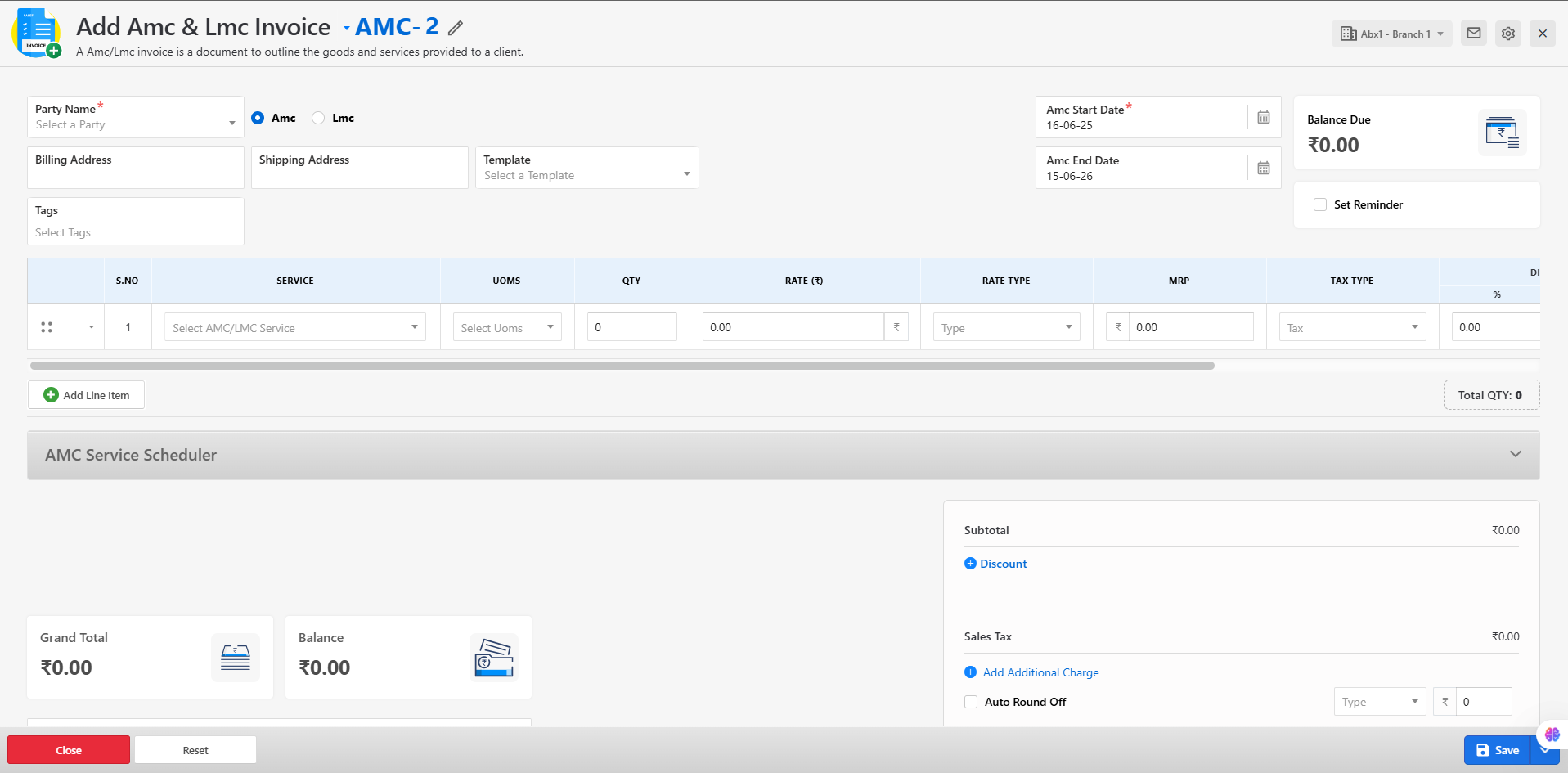
To create a new AMC invoice, click on the "New AMC & LMC Invoice" button located at the top-right corner of the page.
-
This will open the AMC invoice creation form with the required input fields.
-
Fill in all the necessary fields in the form and click Save to generate the invoice.
-
If the invoice is saved successfully, a success message will be displayed on the invoice list page.
-
In case of any validation errors or submission issues, an error message will appear on the form itself.
Available Actions for AMC Invoices
Once an AMC invoice is created, you can manage it using the following options from the list:
Edit – Modify the invoice before finalization.
View – View the complete invoice details in read-only mode.
Delete – Remove the invoice permanently if it is no longer required.
Cancel – Mark the invoice as canceled (for record-keeping purposes).
Download – Download a copy of the invoice in PDF format.
Original Print – Print the original version of the invoice.
Duplicate Print – Print a duplicate copy of the invoice.
Triplicate Print – Print a triplicate copy of the invoice for internal or client records.
WhatsApp – Share the invoice via WhatsApp.
Send WhatsApp PDF – Send the invoice in PDF format via WhatsApp.
Receipt – Generate a payment receipt for the invoice.
Send Mail – Email the invoice directly to the customer.
This module ensures effective tracking and billing of AMC services, streamlining maintenance-related invoicing processes.
-
Status Tracking
- Invoices are marked with statuses such as Draft, Pending Approval, Approved, Paid, or Canceled, allowing clear tracking of the invoice lifecycle.
-
Integration with Reports
- All AMC invoices are integrated into financial and customer billing reports for better visibility and audit compliance.
LMC Invoice
An LMC (Labour Maintenance Contract) Invoice is a billing document generated for services rendered under a Labour Maintenance Contract. This type of contract typically covers the cost of labor involved in maintaining or servicing equipment, while the charges for spare parts used during maintenance are billed separately.
Purpose
LMC Invoices are used to bill customers for labor services performed as part of the agreed-upon maintenance contract. Unlike AMC invoices, which may include both parts and labor, LMC invoices focus solely on service charges for labor, with separate billing for any spares used.
Key Features of the LMC Invoice Module
-
Contract-Based Invoicing
-
LMC invoices are linked to active Labour Maintenance Contracts assigned to the customer.
-
The invoice reflects the service period, frequency, and labor charges as defined in the contract.
-
-
Spares Billing
-
Charges for spare parts used during maintenance are added separately within the same invoice or billed through related sales/service modules.
-
Spare details include part number, quantity, rate, and applicable taxes.
-
-
Invoice Creation
Users can create LMC invoices in the following ways:
-
Manual Entry – Generate the invoice directly through the interface based on performed services.
-
Scheduled Generation – Create recurring invoices based on predefined billing cycles.
-
Invoice Management
The Labour Maintenance Contract (LMC) Invoice section allows users to manage invoices related to labor services and associated spare parts under maintenance contracts.
Steps to Access and Create LMC Invoices
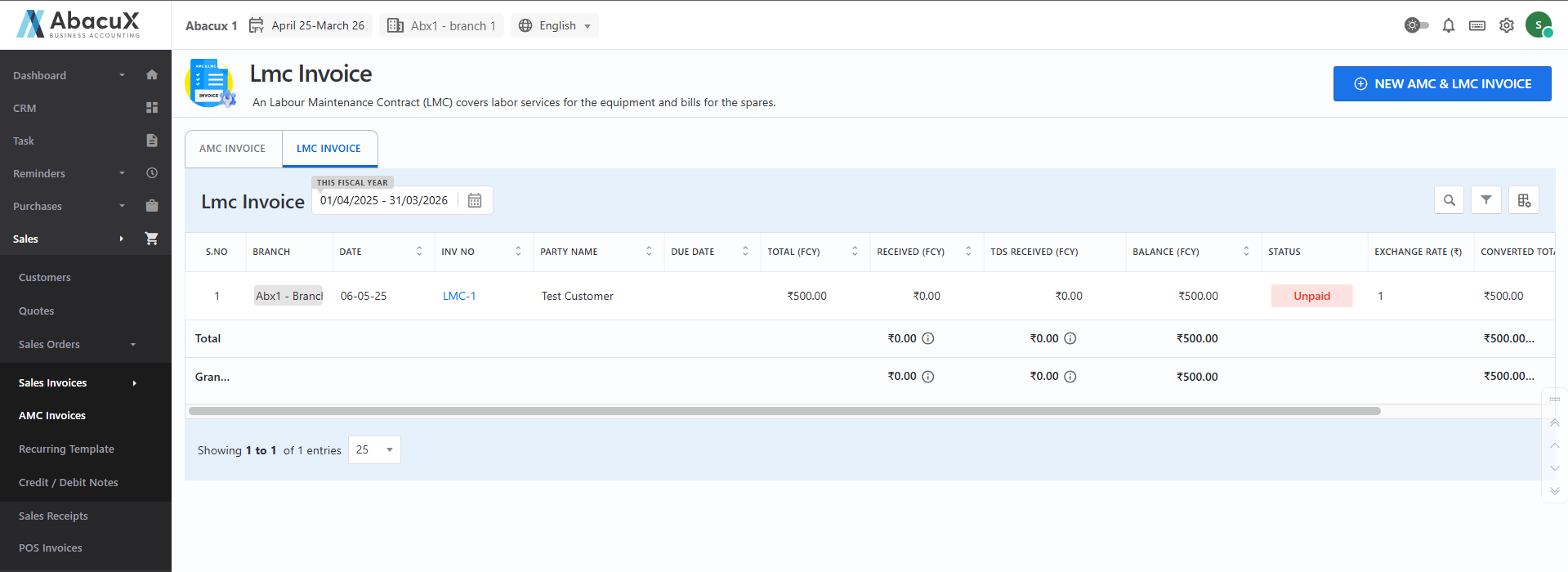
- Click on the LMC Invoice tab to view the list of existing LMC invoices.
-
To create a new LMC invoice, click on the "New AMC & LMC Invoice" button located at the top-right corner of the page.
-
The system will open the LMC invoice creation form with all required input fields.
-
Fill in the necessary fields and click Save to generate the LMC invoice.
-
Upon successful submission, a success message will be displayed on the invoice list page.
-
If there are any validation issues or errors during submission, an appropriate error message will be shown on the form.
Available Actions for LMC Invoices
After creating an LMC invoice, you can manage it using the following available actions:
Edit – Modify invoice details.
View – View complete invoice information in a read-only format.
Delete – Permanently delete the invoice if required.
Cancel – Mark the invoice as canceled.
Download – Download a PDF version of the invoice.
Original Print – Print the original invoice.
Duplicate Print – Print a duplicate copy of the invoice.
Triplicate Print – Print a triplicate copy for records.
WhatsApp – Share the invoice via WhatsApp.
Send WhatsApp PDF – Send the invoice PDF through WhatsApp.
Receipt – Generate a receipt for payment confirmation.
Send Mail – Email the invoice directly to the customer.
This section streamlines the billing process for labor-based service contracts and ensures accurate tracking of service-related invoices.