Delivery Challans
Delivery Challans
A Delivery Challan is a formal document used to accompany the shipment of goods from the seller to the buyer. It is typically issued when goods are delivered without an immediate sale or invoice, such as for approval, returnable items, job work, or internal transfers. In your ERP application, delivery challans help track goods movement and ensure proper inventory control.
Purpose of a Delivery Challan
The Delivery Challan serves several important functions:
Acts as proof of goods dispatch and receipt.
Tracks the movement of stock between locations or to customers.
Supports non-invoice-based deliveries such as samples, repairs, or job work.
Helps maintain inventory accuracy and prevents stock discrepancies.
Facilitates compliance with statutory requirements.
Key Features in the ERP Application
Challan Generation
- Create delivery challans manually or directly from sales orders or invoices.
Linked Documents
- Link delivery challans to related sales orders, invoices, or return documents.
Inventory Impact
- Automatically adjusts stock levels upon challan generation and delivery.
Printable Format
- Generate downloadable and printable versions of delivery challans for physical shipment.
Status Tracking
- Track challan status such as “Pending,” “Delivered,” or “Acknowledged.”
Managing Delivery Challans
The Delivery Challans module allows users to create, manage, and track the dispatch of goods to customers. It ensures accurate documentation for the movement of stock and supports seamless transition to sales invoicing when required.
Steps to Access and Create a Delivery Challan
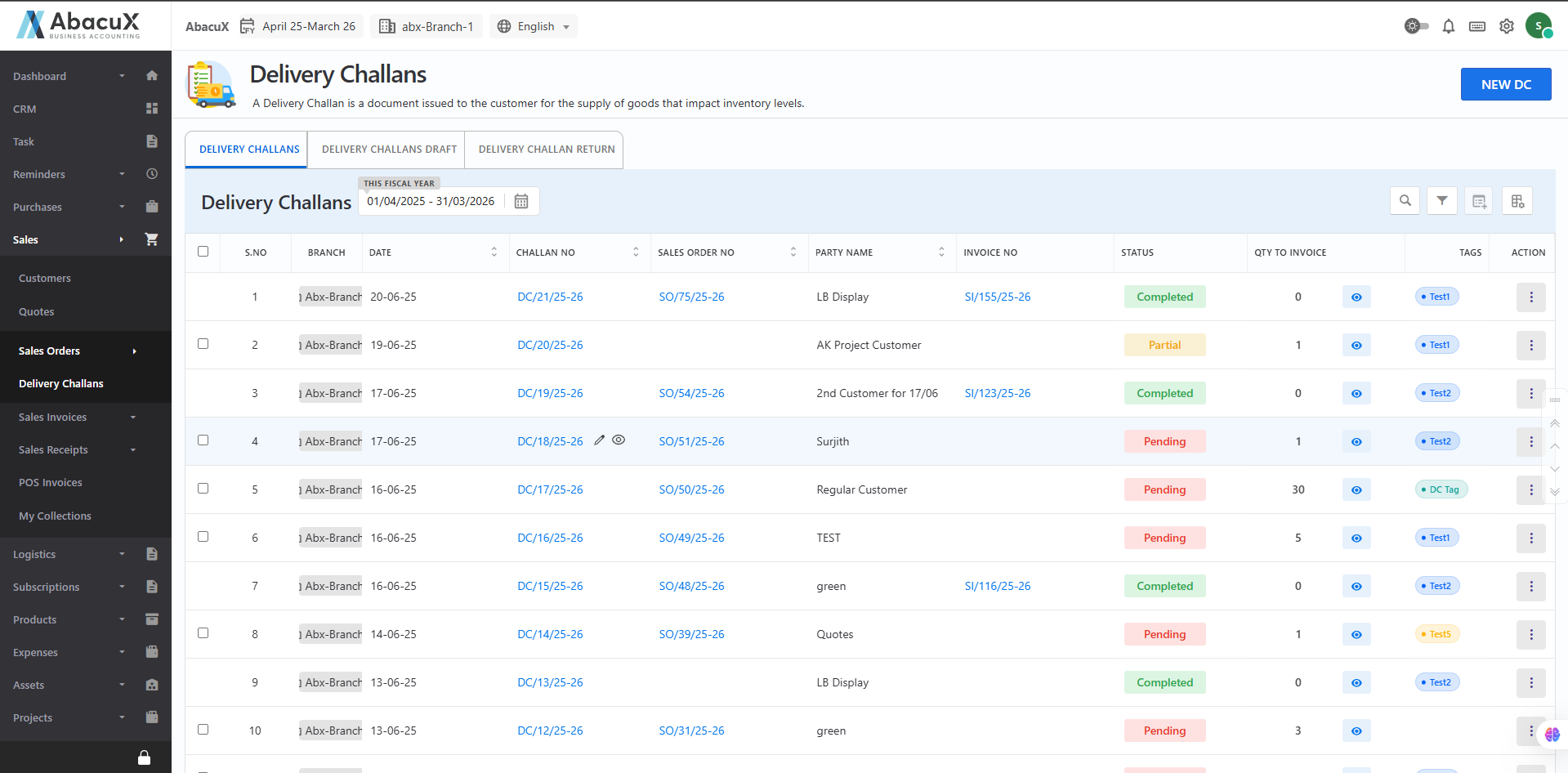
- Navigate to Sales > Sales Orders > Delivery Challans to view the list of existing delivery challans.
-
To create a new delivery challan, click the "New DC" button located at the top-right corner of the page.
-
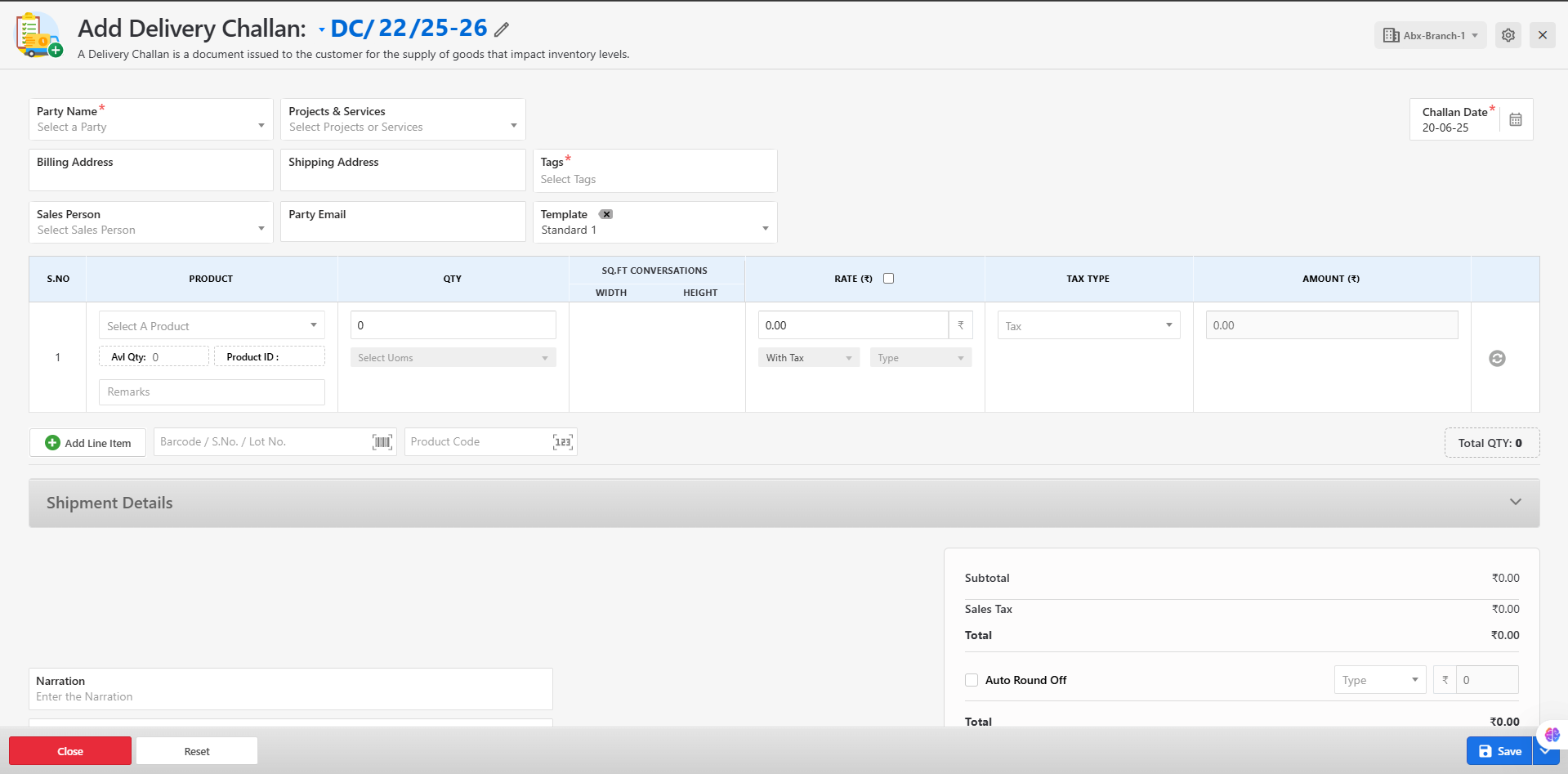
The delivery challan entry form will open for input.
-
Fill in all required fields such as:
-
Customer details
-
Challan date
-
Product information
-
Shipping address
-
Click Save to submit the form.
-
-
Upon successful submission, a success message will be displayed, and the challan will appear in the list.
-
If there are any errors during submission, they will be shown directly on the form for correction.
Available Actions for Delivery Challans
From the delivery challan list, users can perform the following actions:
Edit – Modify challan details before dispatch.
View – Preview the delivery challan in read-only format.
Delete – Remove a challan if no longer needed.
Download – Export the challan as a PDF file.
Original Print – Generate a physical copy of the delivery challan.
Create Invoice – Convert the delivery challan into a sales invoice.
Benefits
-
Ensures compliance with legal documentation for non-invoiced goods.
-
Provides traceability and accountability for all goods dispatched.
-
Enhances inventory accuracy and operational efficiency.
-
Improves customer communication and shipment documentation.
Delivery Challans Drafts
A Delivery Challan Draft refers to a preliminary or unsaved version of a delivery challan that has been created but not yet finalized or confirmed. This feature allows users to prepare and review delivery challans before committing inventory or dispatching goods.
While the purpose of a delivery challan is to accompany the physical movement of goods, the draft mode enables users to create, save, and refine challans before updating stock or initiating shipment.
Purpose of Delivery Challan Drafts
-
Allows users to prepare delivery challans in advance.
-
Helps in reviewing and verifying product quantities, delivery addresses, and remarks before final confirmation.
-
Prevents unintentional impact on inventory or dispatch operations.
-
Supports collaboration among teams (e.g., sales, logistics, warehouse) before execution.
Key Features
-
Create delivery challans and save them in draft mode without affecting inventory.
-
Edit or delete drafts before converting them into finalized challans.
-
Maintain a clear separation between drafted and issued challans.
-
Prevent premature stock deduction and document errors.
Managing Drafted Delivery Challans
The Delivery Challan Drafts section allows users to view and manage delivery challans that have been created but not yet finalized. Drafts can be edited or removed before confirmation, allowing users to review and complete the document accurately before dispatching goods or updating inventory.
Steps to Access Delivery Challan Drafts
- Click on the "Delivery Challan Draft" tab to view the list of all drafted delivery challans.
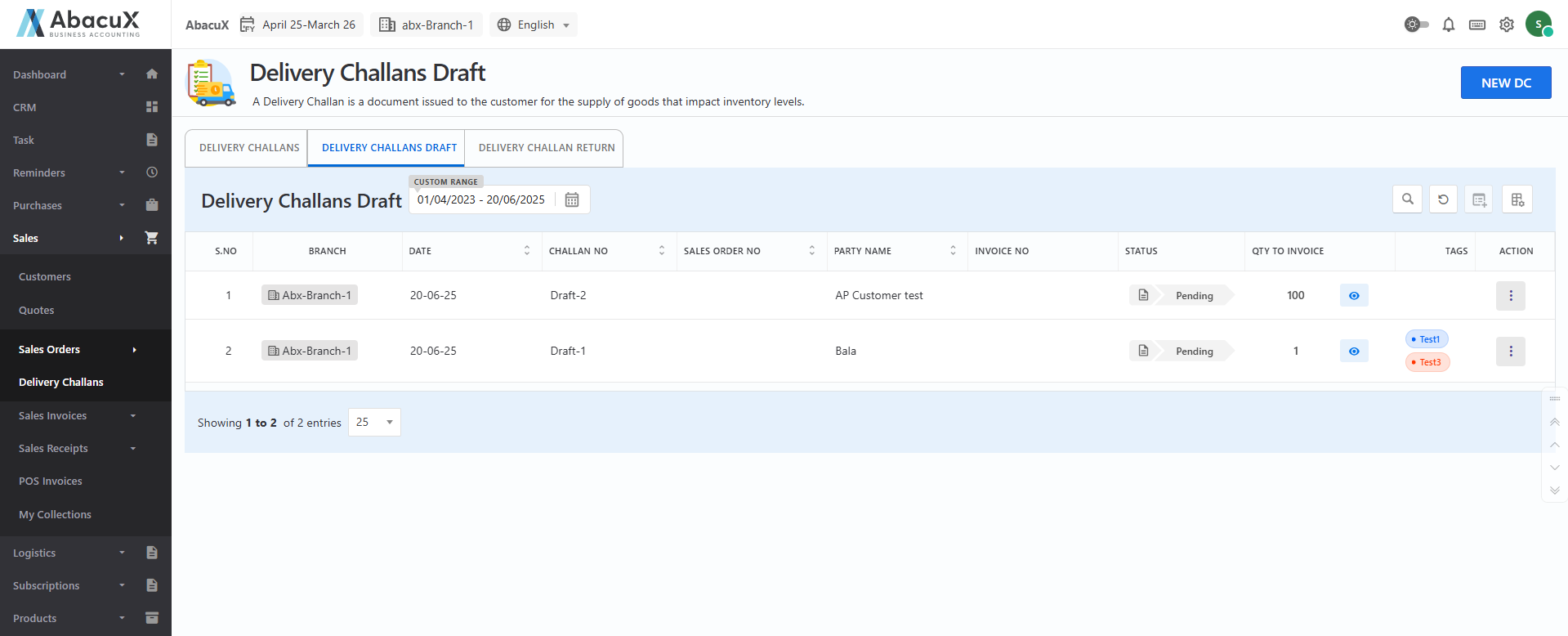
- Drafts represent delivery challans that are saved but not submitted or finalized.
Available Actions for Draft Delivery Challans
Users can manage draft delivery challans with the following actions:
Edit – Update the draft with correct or additional information before finalizing.
Delete – Permanently remove the draft if it is no longer needed.
Benefits
-
Reduces errors by allowing data verification before final submission.
-
Supports workflow planning by enabling draft preparation ahead of dispatch.
-
Ensures better coordination between departments involved in delivery and stock handling.
Delivery Challan Return
A Delivery Challan Return Draft is a preliminary document created to record the return of goods from a customer to your warehouse, based on a previously issued delivery challan. The draft version allows users to prepare, review, and verify the return details before final submission, ensuring inventory accuracy and operational control.
Purpose of Delivery Challan Return Drafts
-
To initiate the return process for goods supplied through a delivery challan.
-
To allow users to review and validate return details before committing stock updates.
-
To prevent inventory discrepancies caused by incorrect or premature return entries.
-
To enable collaborative workflows among departments such as sales, logistics, and warehouse teams.
Typical Use Cases
-
The customer is returning goods due to excess delivery, damages, or other reasons.
-
Internal review of returned items is required before inventory is updated.
-
Returns are scheduled but pending physical receipt and confirmation.
Key Features
-
Create a return draft for any issued delivery challan.
-
Specify return quantities and reasons for return.
-
Maintain draft status without affecting warehouse stock until finalized.
-
Update or delete drafts before converting to a confirmed delivery challan return.
Managing Delivery Challan Returns
The Delivery Challan Return module allows users to record and manage the return of goods from customers to the warehouse, based on previously issued delivery challans. This ensures proper inventory tracking and documentation of returned items.
Steps to Access and Create a Delivery Challan Return
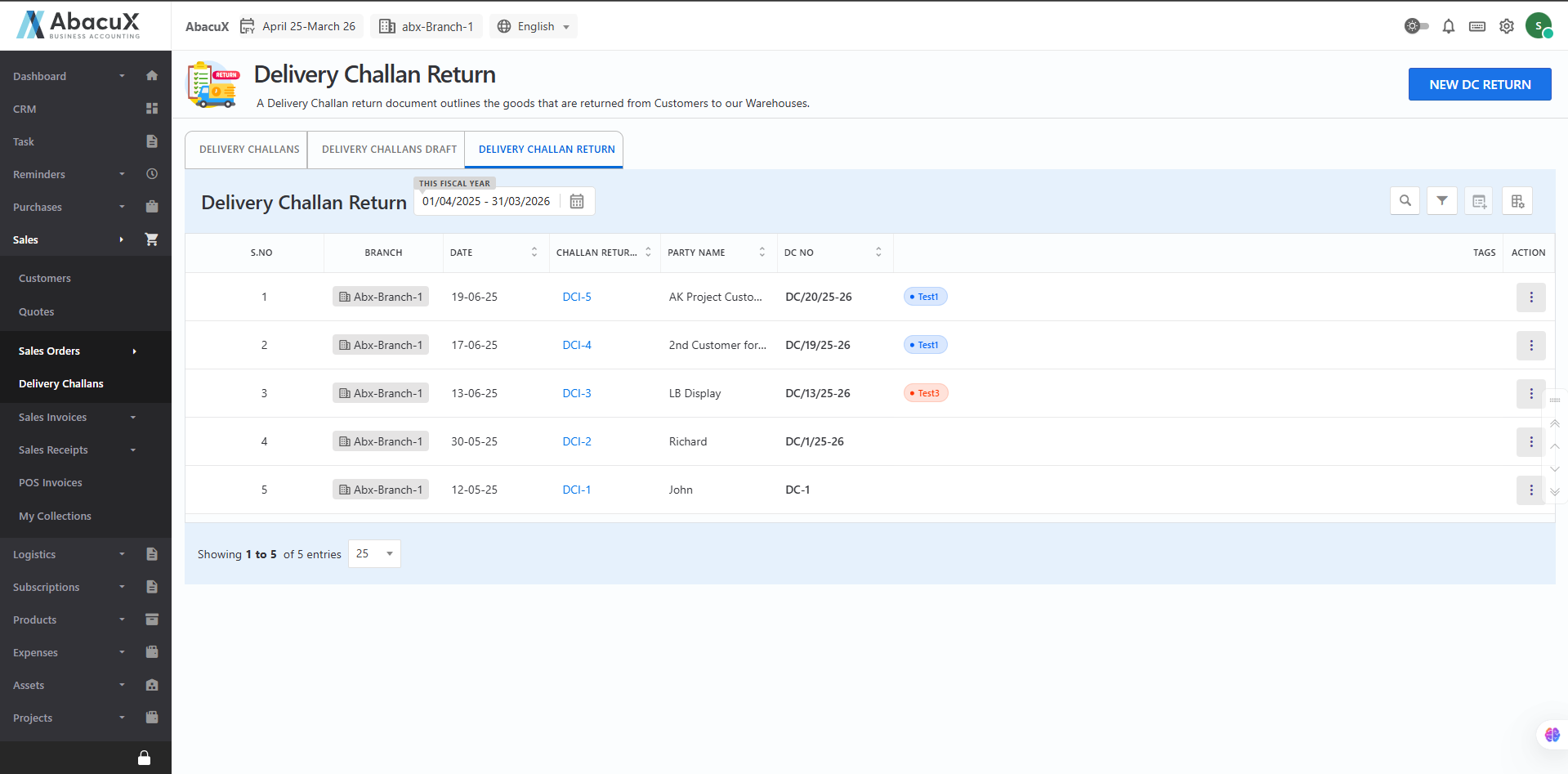
- Click on the "Delivery Challan Return" tab to view the list of all recorded delivery challan returns.
-
To add a new return entry, click the "New DC Return" button located at the top-right corner of the page.
-
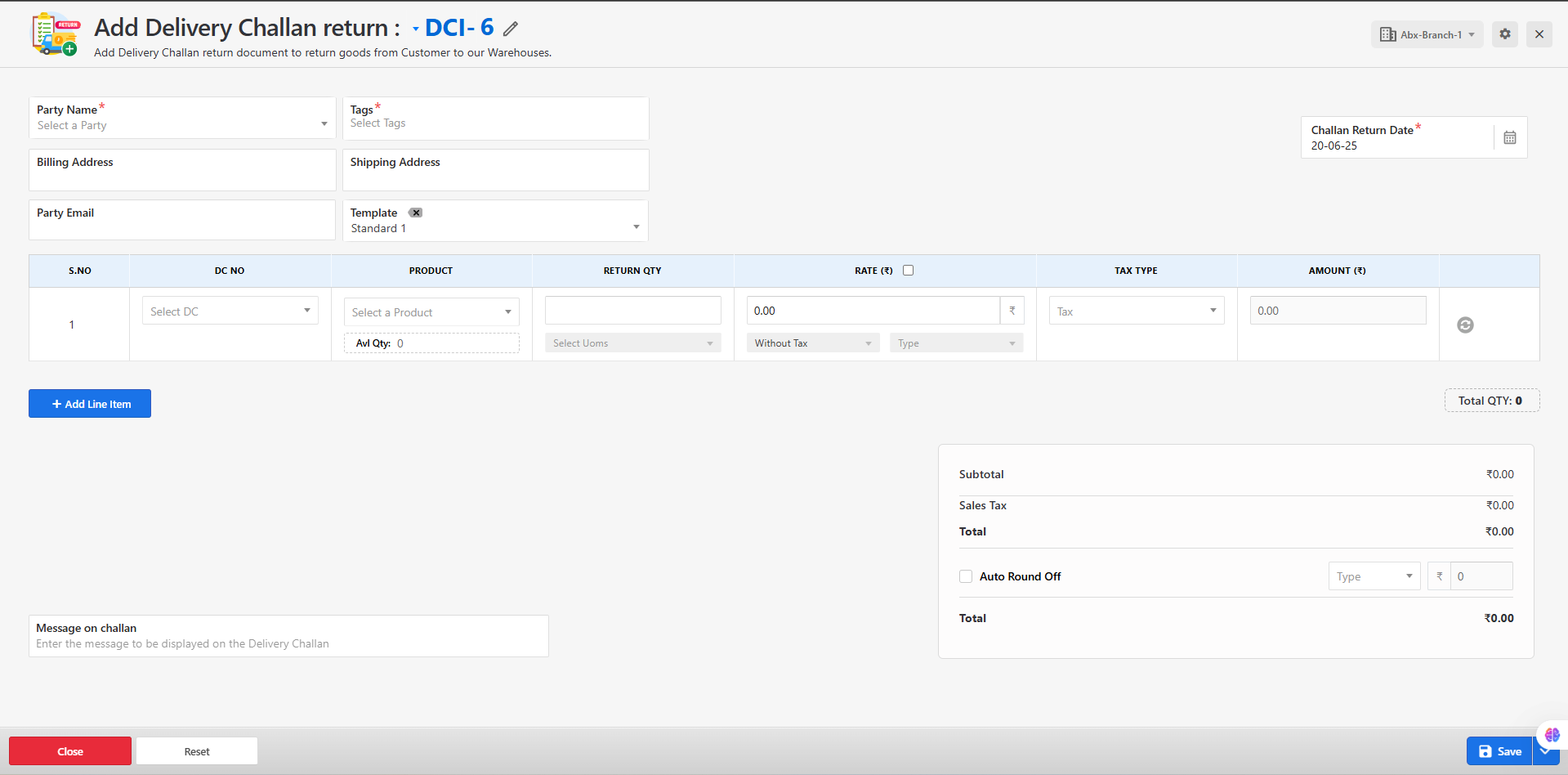
The Delivery Challan Return form will open with the relevant fields.
-
Fill in all the required fields, such as:
-
Original Delivery Challan reference
-
Customer name
-
Items being returned
-
Quantities and reason for return
-
-
Click Save to submit the form.
-
Upon successful submission, a success message will appear, and the return entry will be added to the list.
-
If any errors occur during submission, an error message will be displayed on the form indicating the issue.
Available Actions for Delivery Challan Returns
Users can manage delivery challan return entries with the following options:
Edit – Modify the return details if necessary.
View – View the return document in a read-only format.
Delete – Remove the return entry if it was created in error.
Download – Export the return document as a PDF.
Create Invoice – Generate an invoice based on the returned items, if applicable.
Benefits
-
Provides a structured and error-free process for managing returned goods.
-
Ensures accountability and traceability for each return transaction.
-
Enhances operational efficiency and inventory accuracy by preventing premature stock changes.